Syncing Time Over the Internet
When you buy a brand new computer—let's say you bought a MacBook—and you open it for the first time, it is not yet connected to any internet. As such, it shows the wrong time. But the moment you connect it to your Wi-Fi for the first time, automatically, it somehow manages to show the correct time. Have you ever wondered how it does this?
If you go to System Settings > General > Date & Time on a Mac, you'll see something like this:
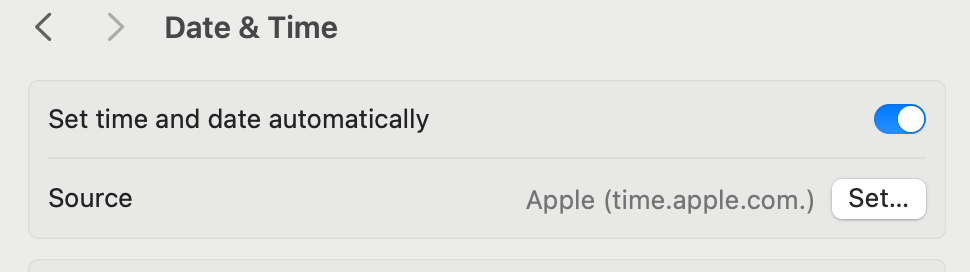
There it is: time.apple.com. That's your Mac quietly reaching out to Apple's time server the moment it gets an internet connection. But what does that actually mean? How does one computer ask another computer "what time is it?" and get back a useful answer?
It turns out, this is a much harder problem than it sounds.
The Two Friends Problem
Imagine you and a friend are chatting over the internet. Your friend is in Tokyo. You're in New York. Your watch has stopped, and you need your friend to tell you the exact time down to the second.
Your friend looks at their clock and types: "It's 2:30:05 PM."
You receive the message and set your watch. Done, right?
Not quite. Think about what happened between the moment your friend looked at their clock and the moment you read that message. The message had to travel through cables, routers, and switches across the Pacific Ocean. Maybe it took 150 milliseconds. Maybe 400. Maybe there was a weird routing hiccup and it took 2 full seconds.
By the time you read "2:30:05 PM," the actual time could already be 2:30:07 PM. You'd set your watch wrong by 2 seconds and never know it.
Now make this worse: you're not chatting with a friend. You're a server processing financial transactions where timestamps determine the order of trades. Or you're a node in a distributed database where every replica needs to agree on when something happened. A few milliseconds of disagreement can mean lost data or duplicated records.
This is the core challenge: the internet has no fixed speed. Every message takes a different amount of time to arrive, and neither side knows exactly how long that delay was. Telling time across a network is fundamentally an estimation problem.
How NTP Actually Solves This
The Network Time Protocol, or NTP, was designed in 1985 by David Mills to solve exactly this problem. The key insight is clever: instead of sending the time once, NTP measures the round trip.
Here's how it works, step by step:
-
Your computer sends a request to a time server and notes the exact moment it sent it. Let's call this T1 = 2:30:00.000.
-
The time server receives the request and notes when it arrived: T2 = 2:30:00.150.
-
The time server sends back a response with its current time, noting when it sent it: T3 = 2:30:00.152.
-
Your computer receives the response and notes the arrival time: T4 = 2:30:00.300.
Now your computer has four timestamps. From these, it can calculate two things:
Round-trip delay: The total time the messages spent traveling on the network:
delay = (T4 - T1) - (T3 - T2)
      = (0.300 - 0.000) - (0.152 - 0.150)
      = 0.300 - 0.002
      = 0.298 seconds
Clock offset: How far off your clock is from the server's clock:
offset = ((T2 - T1) + (T3 - T4)) / 2
       = ((0.150 - 0.000) + (0.152 - 0.300)) / 2
       = (0.150 + (-0.148)) / 2
       = 0.001 seconds
Your clock is about 1 millisecond behind. NTP adjusts accordingly.
The clever part is the assumption that the network delay is roughly symmetric—the message takes about the same time going to the server as it does coming back. That's not always true, but by repeating this process many times with multiple servers and averaging the results, NTP gets remarkably close. Modern implementations achieve accuracy within a few milliseconds over the public internet.
Why Not Just Use GPS?
You might wonder: if satellites already broadcast precise time signals, why bother with this complicated network dance?
Some systems do use GPS. Stratum 0 time sources—the most accurate clocks in the NTP hierarchy—are often atomic clocks or GPS receivers. But putting a GPS receiver in every laptop and phone isn't practical. GPS needs a clear view of the sky, uses extra power, and adds hardware cost. NTP lets any device with an internet connection piggyback on those high-precision clocks through a chain of servers.
The hierarchy works like this:
- Stratum 0: Atomic clocks, GPS receivers (the reference clocks themselves)
- Stratum 1: Servers directly wired to a stratum 0 source
- Stratum 2: Servers that sync from stratum 1
- Stratum 3: Servers that sync from stratum 2
- And so on...
Your MacBook connecting to time.apple.com is actually talking to a stratum 1 server—Apple runs a fleet of them across multiple US cities, each directly connected to reference clocks. That's just one hop from an atomic clock. Most public NTP pools operate at stratum 2 or 3, and even at those levels, accuracy is well within a few tens of milliseconds—more than enough for daily use.
Why Does This Matter to You?
You might think: who cares if my clock is off by a few hundred milliseconds? Here's why you should:
Security depends on it. HTTPS certificates have validity windows. Kerberos authentication tokens expire within minutes. Two-factor authentication codes rotate every 30 seconds. If your clock is significantly wrong, any of these can fail—and you'll get mysterious errors with no obvious cause.
Your files depend on it. Build systems, file synchronization tools like Dropbox, and version control systems use timestamps to determine which version of a file is newer. A wrong clock can make your computer think an old file is the latest version, silently overwriting your recent work.
Every distributed system depends on it. If you use any cloud service—which you do—the servers behind it need to agree on time. Databases use timestamps to order writes. Log aggregation systems use them to reconstruct what happened during an incident. Payment systems use them to sequence transactions. When clocks disagree, debugging becomes a nightmare because events appear to happen in the wrong order—or simultaneously when they didn't.
Even your daily experience depends on it. Calendar reminders, meeting notifications, message ordering in chat apps, flight check-ins, auction deadlines—all of these quietly depend on your device having a reasonably accurate clock.
It's Running Right Now
The beautiful thing about NTP is that you've been using it your entire digital life without knowing. Every phone, every laptop, every server, every smart TV - they're all periodically reaching out to time servers, running that four-timestamp dance, and nudging their clocks a little closer to the truth.
That time.apple.com entry in your Mac settings? It's not a one-time thing. Your Mac checks back regularly, maybe every few minutes at first, then every few hours once it's confident the clock is stable. It doesn't jump the clock suddenly (that would confuse running programs). Instead, it slews the clock like speeding it up or slowing it down just slightly until it catches up. Abrupt steps are only used when the offset exceeds 128 milliseconds and persists for more than 300 seconds, which under normal conditions, almost never happens. You never notice.
Next time you glance at the clock on your screen, know that behind that simple number is a decades-old protocol, a hierarchy of atomic clocks and servers spanning the globe, and a small mathematical trick that turns unreliable network delays into remarkably accurate time. All happening silently, billions of times a day, keeping the internet in sync.