PostgreSQL Beyond Tables
I, like many other developers, use PostgreSQL regularly. Much of that work starts with familiar tasks like creating a table, writing a query, or changing something through a migration. We use tools such as psql and pgAdmin 4 mainly to browse stored data and make changes to it. But a database browser shows rather more than those tasks suggest. Alongside tables, there are sequences, functions, types, languages, and several other categories I don't need to think about every day.
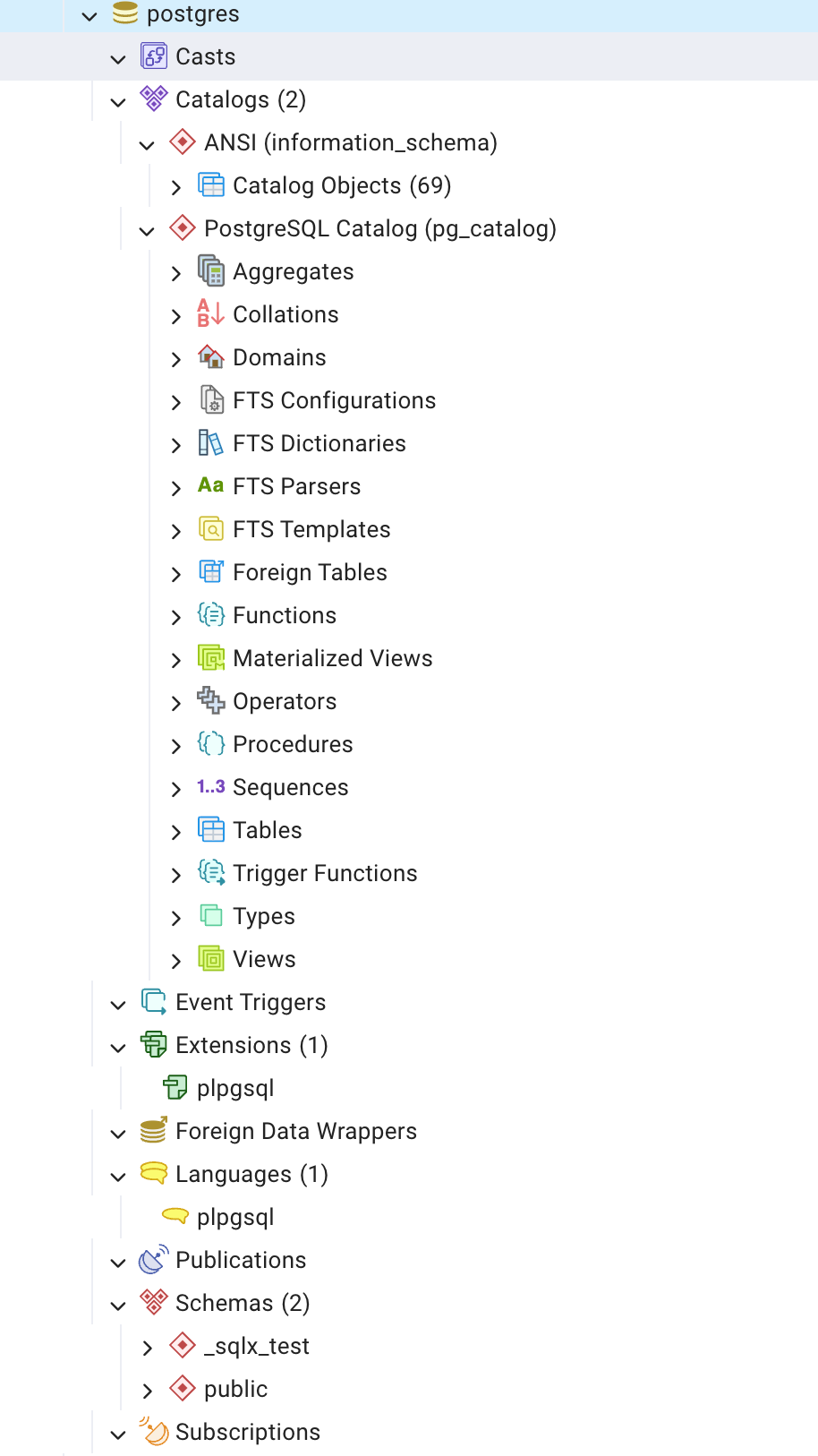
postgres database in pgAdmin 4. We'll create our own organization database below.Let's take some time to connect those names to the SQL we already use. We'll create a database, fill it with some data, and inspect it as we go. Having a few rows of our own should make the behaviour easier to follow than reading through a list of PostgreSQL features.
Let's call the database organization. We'll model two entities: employees and departments. We'll create two tables, employees and departments, to store their details. An employee_departments join table will record which employees belong to which departments. An employee can belong to more than one department.
We'll also use our own schema. Once we've created it, the structure will look like this:
PostgreSQL cluster
`-- organization                       database
    |-- people                         application schema
    |   |-- employees                  table
    |   |-- departments                table
    |   `-- employee_departments        table
    |-- public                         unused by this example
    |-- pg_catalog                     system catalogues and built-ins
    `-- information_schema             standard metadata views
Here, cluster means a collection of databases managed by a PostgreSQL server instance. It doesn't necessarily mean several machines. Our connection selects one database; a schema is a namespace within it. So people.employees names a table in the people schema, not another database. Roles, which represent users or groups of users, exist at the cluster level. The schema documentation explains these boundaries.
Starting a psql session
You'll need a running development PostgreSQL server, the psql client, and a role with permission to create a database. Use a disposable local setup, not a production connection. These commands assume organization does not already exist; if it does, stop and choose another name rather than replacing it.
The examples were checked with PostgreSQL and psql 18.3. Run them in order. Some descriptive output, including owners, timestamps, and internal identifiers, will differ on your machine.
From a terminal, connect to the existing postgres database:
psql -X -d postgresThis uses your configured connection defaults, usually a local socket and your operating-system username. Add -h localhost -U your_role if your installation needs them. The postgres after -d is a database name, not the login role. -X skips your psql startup file so personal settings don't change the exercise.
Inside psql, check where you are before creating anything:
\conninfo
\l
\pset pager off
\set ON_ERROR_STOP on
\conninfo describes the connection and \l lists databases. Disabling the pager keeps results in the terminal. ON_ERROR_STOP stops a script at an unexpected error; in an interactive session, it stops processing the current input without closing your connection.
Backslash commands belong to psql. SQL goes to the server. That distinction explains why SQL normally ends with a semicolon while these inspection commands do not. The psql reference is useful when you forget a command.
We can now create the database:
CREATE DATABASE organization;That should report CREATE DATABASE. Run it on its own, outside a BEGIN block. Creating a database is one of the operations PostgreSQL doesn't allow inside an explicit transaction.
Switch the connection to it:
\connect organizationSubsequent statements will run in organization. Creating it did not switch our connection automatically.
Giving our tables a home
We'll first name the schema workforce, inspect it, then rename it to people:
CREATE SCHEMA workforce;The new name should appear in the schema list:
\dnNow change it:
ALTER SCHEMA workforce RENAME TO people;Inspecting the list again shows people in place of workforce:
\dnWe have renamed our own schema. The database is still organization, and public remains in place. We'll leave it unused.
PostgreSQL uses search_path to resolve names without a schema prefix. We can inspect and change that setting for this session:
SHOW search_path;
SET search_path TO people;
SHOW search_path;
SELECT current_database(), current_schema();
The final query should return organization and people. An unqualified table name such as employees can now resolve in people; an unqualified CREATE TABLE would create its table there. We'll still write people.employees in most examples to keep the location visible.
pg_catalog is implicitly searched before our listed schemas when it isn't explicitly in the path. Built-in types and functions therefore remain available. This SET lasts only for the connection. Also, including a schema in your search path means trusting people who can create objects there: choosing a different schema name alone doesn't secure it. These search-path rules matter beyond this exercise.
Three tables, and what comes with them
Our employee details need a name, email, joining date, and salary. We'll treat salary as a monthly amount in one currency throughout the example; a real payroll model would need more information.
Create the tables together:
BEGIN;

CREATE TABLE people.employees (
    employee_id bigint GENERATED ALWAYS AS IDENTITY PRIMARY KEY,
    first_name text NOT NULL,
    last_name text NOT NULL,
    email text NOT NULL UNIQUE,
    hire_date date NOT NULL DEFAULT CURRENT_DATE,
    salary numeric(12, 2) NOT NULL CHECK (salary > 0),
    is_active boolean NOT NULL DEFAULT true,
    created_at timestamptz NOT NULL DEFAULT CURRENT_TIMESTAMP
);

CREATE TABLE people.departments (
    department_id bigint GENERATED ALWAYS AS IDENTITY PRIMARY KEY,
    name text NOT NULL UNIQUE
);

CREATE TABLE people.employee_departments (
    employee_id bigint NOT NULL
        REFERENCES people.employees(employee_id),
    department_id bigint NOT NULL
        REFERENCES people.departments(department_id),
    assigned_on date NOT NULL DEFAULT CURRENT_DATE,
    PRIMARY KEY (employee_id, department_id)
);

CREATE INDEX employee_departments_department_id_idx
    ON people.employee_departments (department_id);

COMMIT;
The column types describe the values we can store. numeric(12, 2) gives us decimal amounts with two fractional digits. The constraints add rules: an email is required and unique, and a salary must be positive. These are intentionally modest rules for the example, not a complete employee-data policy.
The join table's primary key covers both IDs, preventing a repeated membership. Its foreign keys require the referenced employee and department to exist. We haven't asked for cascading deletes, so deleting a parent with memberships still attached will fail. PostgreSQL documents these behaviours under constraints.
List the tables, then inspect the structure around them:
\dt people.*
\d people.employees
\d people.employee_departments
\di people.*
\ds people.*
There should be three tables, six indexes, and two sequences. Five indexes came from our primary-key and unique constraints; we explicitly added the sixth. Identity columns use sequences to generate IDs. Identity itself doesn't guarantee uniqueness, which is why we also declared primary keys. The identity-column rules keep those responsibilities separate.
The extra index starts with department_id, whereas the join table's primary-key index starts with employee_id. It supports looking up memberships by department. PostgreSQL doesn't automatically index the referencing columns of a foreign key. With six memberships, we shouldn't expect a useful speed comparison; whether this index earns its space in a larger application depends on the queries.
Putting a few people in the database
We'll insert five employees, three departments, and six memberships in one transaction. RETURNING lets us inspect values assigned during the insert:
BEGIN;

INSERT INTO people.departments (name)
VALUES ('Engineering'), ('Finance'), ('People Operations')
RETURNING *;

INSERT INTO people.employees
    (first_name, last_name, email, hire_date, salary)
VALUES
    ('John', 'Doe', 'john@example.com', DATE '2024-02-12', 120000.00),
    ('Jane', 'Smith', 'jane@example.com', DATE '2024-05-20', 95000.00),
    ('Alice', 'Brown', 'alice@example.com', DATE '2023-11-06', 110000.00),
    ('Bob', 'Wilson', 'bob@example.com', DATE '2025-01-15', 85000.00),
    ('Emma', 'Taylor', 'emma@example.com', DATE '2025-06-02', 90000.00)
RETURNING employee_id, first_name, email;

INSERT INTO people.employee_departments (employee_id, department_id)
SELECT e.employee_id, d.department_id
FROM (
    VALUES
        ('john@example.com', 'Engineering'),
        ('jane@example.com', 'Engineering'),
        ('alice@example.com', 'Finance'),
        ('bob@example.com', 'People Operations'),
        ('emma@example.com', 'Engineering'),
        ('john@example.com', 'Finance')
) AS membership(email, department_name)
JOIN people.employees AS e ON e.email = membership.email
JOIN people.departments AS d ON d.name = membership.department_name;

COMMIT;
We look up the generated IDs using unique emails and department names. The membership insert therefore doesn't depend on John receiving ID 1. It does depend on those lookups finding a match: a missing email or department would silently omit that membership. Here we expect six inserted rows; application code should check the affected-row count when a missing match is an error.
During these inserts, the defaults filled omitted fields such as is_active and created_at. Sequences supplied IDs, constraints checked the rows, and indexes were maintained alongside the table data. BEGIN and COMMIT grouped the changes into one transaction, so another session couldn't observe a half-finished seed operation.
We can check all three counts in one result:
SELECT
    (SELECT count(*) FROM people.employees) AS employees,
    (SELECT count(*) FROM people.departments) AS departments,
    (SELECT count(*) FROM people.employee_departments) AS memberships;
The result should be:
 employees | departments | memberships
-----------+-------------+-------------
         5 |           3 |           6
Now read the memberships as names rather than IDs:
SELECT e.first_name || ' ' || e.last_name AS employee,
       d.name AS department,
       e.salary
FROM people.employees AS e
JOIN people.employee_departments AS ed
    ON ed.employee_id = e.employee_id
JOIN people.departments AS d
    ON d.department_id = ed.department_id
ORDER BY employee, department;
The six rows should look like this, apart from terminal spacing:
employee    | department        | salary
------------+-------------------+----------
Alice Brown | Finance           | 110000.00
Bob Wilson  | People Operations |  85000.00
Emma Taylor | Engineering       |  90000.00
Jane Smith  | Engineering       |  95000.00
John Doe    | Engineering       | 120000.00
John Doe    | Finance           | 120000.00
John appears twice because he belongs to two departments. There is still only one employee row for him.
Making a mistake inside a transaction
Outside an explicit transaction, psql normally commits each successful SQL statement automatically. We used an explicit transaction because the seed operation needed to succeed as a whole. A failed statement inside it would leave the transaction needing recovery, not quietly commit the earlier inserts.
We can see that with a deliberately invalid membership. Temporarily allow the expected error, begin a transaction, and put a savepoint before the insert:
\set ON_ERROR_STOP off
BEGIN;
SAVEPOINT before_invalid_membership;
A savepoint marks a place we can roll back to while keeping earlier work in the transaction. Now try to assign John to department -1, which doesn't exist in our database:
INSERT INTO people.employee_departments (employee_id, department_id)
SELECT employee_id, -1
FROM people.employees
WHERE email = 'john@example.com';
PostgreSQL should report a foreign-key violation. Its detail includes:
DETAIL: Key (department_id)=(-1) is not present in table "departments".The transaction is now in a failed state. Recover to the savepoint and finish it:
ROLLBACK TO SAVEPOINT before_invalid_membership;
COMMIT;
\set ON_ERROR_STOP on
Our original six memberships remain. Without a savepoint, we'd use ROLLBACK to abandon the transaction. PostgreSQL's transaction tutorial describes both forms. The important practical detail is that an error needs to be handled before an explicit transaction can continue normally.
Two sessions, two views of a change
Keep this first connection open as session A. In another terminal, open session B with the same connection options:
psql -X -d organizationWe use fully qualified table names below, so session B doesn't need our earlier search_path setting. Leave it outside an explicit transaction for this experiment.
In session A, raise John's salary without committing:
BEGIN;
UPDATE people.employees
SET salary = salary + 5000
WHERE email = 'john@example.com';

SELECT salary FROM people.employees
WHERE email = 'john@example.com';
Session A sees 125000.00. Before doing anything else there, read the same row in session B:
SELECT salary FROM people.employees
WHERE email = 'john@example.com';
Session B sees 120000.00. Its ordinary SELECT can read the earlier committed version while A's update is unfinished.
Return to session A and undo the change:
ROLLBACK;
SELECT salary FROM people.employees
WHERE email = 'john@example.com';
The salary is back to 120000.00. If A had committed instead, a subsequent query in B, under the default Read Committed isolation level, would see the new value. That level takes a fresh snapshot for each statement. The isolation documentation explains why a longer transaction using another level can behave differently.
PostgreSQL calls its row-version approach multiversion concurrency control, or MVCC. A reader's snapshot determines which versions it can see. This doesn't remove the need for locks: another writer trying to update John's row could have to wait. MVCC helps explain the read we just observed; it isn't a promise that every concurrent operation proceeds without waiting.
You can close session B now. Continue the remaining examples in A.
Why a missing ID isn't a missing employee
There is an important exception to the rollback behaviour we've seen. Ask PostgreSQL which sequence supplies employee IDs:
SELECT pg_get_serial_sequence('people.employees', 'employee_id');The result is people.employees_employee_id_seq. Despite its historical name, pg_get_serial_sequence also works with identity columns.
Insert a temporary employee and roll the row back:
BEGIN;
INSERT INTO people.employees (first_name, last_name, email, salary)
VALUES ('Temporary', 'Employee', 'temporary@example.com', 50000)
RETURNING employee_id;
ROLLBACK;

SELECT count(*) FROM people.employees
WHERE email = 'temporary@example.com';

SELECT last_value FROM people.employees_employee_id_seq;
On a fresh run, the insert allocates ID 6. The count afterward is 0, but the sequence's last_value remains 6. The next allocation will normally be 7. Repeating the exercise advances it further.
Sequence allocations aren't undone by rollback. Reusing abandoned values would interfere with other sessions allocating IDs concurrently. A gap therefore doesn't tell us that someone deleted an employee, and an ID isn't a reliable row count. Gapless invoice numbers would need a separate design.
Reading PostgreSQL's description of our tables
PostgreSQL keeps metadata about the objects we've created. information_schema exposes standard views of that metadata. We can list our tables directly:
SELECT table_schema, table_name, table_type
FROM information_schema.tables
WHERE table_schema = 'people'
ORDER BY table_name;
At this point, all three rows should say BASE TABLE. To look inside one of them, inspect the columns:
SELECT column_name, data_type, is_nullable, is_identity, column_default
FROM information_schema.columns
WHERE table_schema = 'people' AND table_name = 'employees'
ORDER BY ordinal_position;
You'll find the eight columns we declared. employee_id has is_identity = YES; its column_default needn't contain a nextval(...) expression. Identity information has its own fields. These metadata views also filter results according to the current role's access, so an absent row isn't always proof that an object doesn't exist.
For PostgreSQL-specific details, we can query pg_catalog. This query joins the catalogue of relations with the catalogue of schemas:
SELECT n.nspname AS schema_name,
       c.relname AS object_name,
       c.relkind AS object_kind
FROM pg_catalog.pg_class AS c
JOIN pg_catalog.pg_namespace AS n ON n.oid = c.relnamespace
WHERE n.nspname = 'people'
ORDER BY c.relkind, c.relname;
In this result, r means an ordinary table, i an index, and S a sequence. These are all relations in PostgreSQL's catalogue terminology. The oid values connect internal objects, much as our IDs connect application rows. pg_class describes relations; other catalogues describe constraints, types, and functions.
The \d command has been querying catalogues for us. We can ask psql to show its generated SQL:
\set ECHO_HIDDEN on
\d people.employees
\set ECHO_HIDDEN off
Expect more output than the table description alone. I find this a useful way to follow an inspection command into the underlying structure. Read these catalogues freely, but change objects through supported commands such as ALTER TABLE, not by editing their metadata rows.
Functions and operators in an ordinary query
We already use more database objects than tables and indexes. This query makes a few of them visible:
SELECT upper(first_name) AS display_name,
       salary * 12 AS annual_salary,
       hire_date::text AS hire_date_text
FROM people.employees
WHERE salary > 90000
ORDER BY first_name;
upper is a function, * and > are operators, and ::text requests a cast. The result contains Alice, Jane, and John. PostgreSQL chooses operations that work with the argument types; these names aren't just punctuation understood by the client.
The matching inspection commands list functions, operators, casts, and types:
\df pg_catalog.upper
\do pg_catalog.*
\dC
\dT pg_catalog.*
Some lists are long. The explicit patterns include built-ins that a default listing may omit. PostgreSQL can also store user-defined objects in these categories.
Aggregates combine values from several rows. We can count department memberships and calculate their average salary:
SELECT d.name AS department,
       count(*) AS employee_count,
       round(avg(e.salary), 2) AS average_salary
FROM people.departments AS d
JOIN people.employee_departments AS ed
    ON ed.department_id = d.department_id
JOIN people.employees AS e ON e.employee_id = ed.employee_id
GROUP BY d.department_id, d.name
ORDER BY d.name;
That gives us:
department        | employee_count | average_salary
------------------+----------------+---------------
Engineering       |              3 |      101666.67
Finance           |              2 |      115000.00
People Operations |              1 |       85000.00
count and avg are aggregates; round is a function applied to the resulting average. You can inspect the aggregate list too:
\da pg_catalog.*The department counts add up to six memberships, not five employees. John contributes to two groups. That follows from our model, regardless of how PostgreSQL executes the query.
Keeping a useful query as a view
The employee directory is a join we'll probably want again. We can give that query a name:
CREATE VIEW people.employee_directory AS
SELECT e.employee_id,
       e.first_name || ' ' || e.last_name AS employee_name,
       e.email,
       d.name AS department
FROM people.employees AS e
JOIN people.employee_departments AS ed
    ON ed.employee_id = e.employee_id
JOIN people.departments AS d ON d.department_id = ed.department_id;
employee_directory is a regular view. It stores the query definition and obtains its result from the underlying tables when queried, rather than keeping a separate copy of the six rows. A materialized view does store results and needs refreshing when we want them brought up to date.
Read our view and compare the object lists:
SELECT * FROM people.employee_directory
ORDER BY employee_name, department;
\dv people.*
\dt people.*
The directory has six rows. \dv shows one view, while \dt still shows three base tables. If we reran the earlier catalogue query, the view would have relkind = v.
A function that runs when a row changes
Database browsers also list languages and extensions. A language describes how a routine is implemented. An extension packages related database objects so they can be installed and managed together.
Inspect both lists:
\dx
\dL
A usual installation includes plpgsql. Seeing it in both lists means the extension supplies the procedural language; it isn't installed twice. We can use that language for a small trigger function.
Suppose we want updates to record a timestamp. Add the column, write the function, and attach it to employee updates:
ALTER TABLE people.employees ADD COLUMN updated_at timestamptz;

CREATE FUNCTION people.set_employee_updated_at()
RETURNS trigger
LANGUAGE plpgsql
AS $$
BEGIN
    NEW.updated_at := CURRENT_TIMESTAMP;
    RETURN NEW;
END;
$$;

CREATE TRIGGER employees_set_updated_at
BEFORE UPDATE ON people.employees
FOR EACH ROW
EXECUTE FUNCTION people.set_employee_updated_at();
The function holds the code; the trigger specifies when it runs. In this row-level trigger, NEW is the proposed updated row. Returning it allows the update to continue with our timestamp added. The trigger-function documentation describes these conventions.
Our existing rows have NULL in the new column. Try an update, inspect it, and then undo it:
BEGIN;
UPDATE people.employees SET salary = salary + 1000
WHERE email = 'jane@example.com';

SELECT salary, updated_at IS NOT NULL AS timestamp_set
FROM people.employees WHERE email = 'jane@example.com';

ROLLBACK;

SELECT salary, updated_at IS NULL AS timestamp_still_empty
FROM people.employees WHERE email = 'jane@example.com';
The first result is 96000.00 and t; after rollback it is 95000.00 and t. Both the salary and timestamp changes belonged to the same transaction. The trigger didn't commit anything independently.
CURRENT_TIMESTAMP uses the transaction's start time, so it won't advance for every row updated in one long transaction. That's worth knowing before treating it as the exact wall-clock time of each edit. The trigger only handles updates; we haven't added insert-time behaviour for this column.
We can find the function and its trigger attachment with:
\df people.*
\d people.employees
This is also why I prefer small, well-documented triggers. An UPDATE statement alone doesn't show all the behaviour attached to the table.
A few other names in the browser
We don't need to add every object category to this database to understand where it fits. A domain is a named type with optional reusable constraints; a collation supplies text comparison and ordering rules. Procedures are routines called with CALL. Event triggers respond to database-definition events, unlike the row update trigger we just created.
Their inspection commands are:
\dD people.*
\dO
\dfp people.*
\dy
Some will report no matching objects. We've created no domains, procedures, or event triggers in this example. Results also depend on privileges and the inspection pattern.
Full-text search has several cooperating object types. A configuration selects a parser and maps token types to dictionaries. The parser splits text into tokens; dictionaries process them into searchable forms called lexemes. Templates provide the functions used to implement dictionaries. These are the parts of text search behind the separate browser entries.
We can inspect them and try a built-in configuration without adding any tables:
\dF
\dFp
\dFd
\dFt

SELECT to_tsvector('english', 'The employees are building useful products')
       @@ plainto_tsquery('english', 'employee') AS matches;
The result is t: the English configuration reduces the relevant word forms to a matching lexeme. The @@ operator tests the search query against the processed document.
Foreign data wrappers and logical replication serve different needs. A wrapper such as postgres_fdw provides access to data in another PostgreSQL server through foreign tables. A foreign server object holds connection settings. Logical replication transfers data changes from publications to subscriptions, usually after an initial data copy.
These commands show any such objects visible to us:
\dew
\des
\dE *.*
\dRp
\dRs
At this point, our exercise hasn't configured either external access or replication. An empty list is expected in a fresh installation.
What makes a committed change durable?
The objects we've inspected describe our data and its rules. There is storage underneath them, including table and index pages held in memory and written to disk. PostgreSQL maintains a write-ahead log, usually shortened to WAL, that records changes for recovery.
The ordering matters: the relevant WAL records must reach durable storage before the corresponding changed data pages are written there. With normal durable settings, a successful commit waits for the required WAL flush; it needn't wait for every changed table page to reach its final location. After a crash, recovery can redo changes from that log. The WAL introduction explains this arrangement.
We can inspect two settings involved in those guarantees:
SHOW fsync;
SHOW synchronous_commit;
A default local installation reports on for both. We're only inspecting them. Different durability settings change the guarantees; this exercise isn't a reason to turn either off. A successful SQL session also isn't a crash-recovery test.
The row versions used by MVCC have a maintenance cost. Versions no active snapshot needs eventually become eligible for cleanup by vacuuming, commonly handled by autovacuum. This helps explain why PostgreSQL continues doing work even when our application isn't issuing another query.
A closer look at the remaining browser entries
Before we finish, let's connect a few more labels in the screenshot to things we can inspect ourselves. Continue in session A for the catalogue, cast, and text-search queries. The optional foreign-table and subscription examples need a separate local administrator session, which we'll open when we reach them.
Catalogues and the schemas in the picture
The browser groups information_schema and pg_catalog under Catalogs. Both are schemas inside the connected database. The ANSI label points to the SQL-standard metadata views in information_schema; Catalog Objects groups the objects inside it. They aren't extra application databases. PostgreSQL's information schema offers a common way to inspect database objects, while pg_catalog exposes PostgreSQL-specific details.
We can find the two metadata views we used earlier:
SELECT table_schema, table_name, table_type
FROM information_schema.tables
WHERE table_schema = 'information_schema'
  AND table_name IN ('columns', 'tables')
ORDER BY table_name;
Both rows say VIEW. These views describe other objects; they don't hold our employee records. The screenshot's 69 is the browser's count for that database and display, not a number our exercise needs to match.
The Schemas branch shows public and _sqlx_test. The latter is a schema in the pictured database, not a required PostgreSQL component. Its name alone doesn't tell us who created it. We can check which of those names exist in our own database, alongside people:
SELECT nspname AS schema_name,
       pg_get_userbyid(nspowner) AS owner
FROM pg_catalog.pg_namespace
WHERE nspname IN ('people', 'public', '_sqlx_test')
ORDER BY nspname;
Our fresh example should show people and public, with no _sqlx_test row. The owner names depend on the installation. We don't need to create the missing schema or remove any existing one to make our database resemble the picture.
Seeing what a cast changes
A cast converts a value from one data type to another. Earlier, hire_date::text converted a date into text. The stored column stayed a date. We can make that distinction visible with pg_typeof:
SELECT hire_date,
       pg_typeof(hire_date) AS stored_type,
       hire_date::text AS date_text,
       pg_typeof(hire_date::text) AS result_type
FROM people.employees
WHERE email = 'john@example.com';
The two values look the same, but their types differ:
hire_date  | stored_type | date_text  | result_type
-----------+-------------+------------+------------
2024-02-12 | date        | 2024-02-12 | text
That matters when we compare, calculate with, or pass the result to a function. CAST(hire_date AS text) is the standard SQL spelling of the same conversion; ::text is PostgreSQL's shorter form. The Casts entry and \dC list registered conversions. Not every conversion appears there individually: PostgreSQL can also use a type's input and output functions for conversions involving strings. The cast documentation explains that distinction.
Following a word through full-text search
FTS stands for full-text search. The four entries in the picture describe parts of the processing we used earlier. We can inspect the English configuration and its dictionary more closely:
\dF+ pg_catalog.english
\dFd+ pg_catalog.english_stem
The configuration uses the default parser and maps word tokens to the english_stem dictionary. That dictionary uses the snowball template, which provides the implementation behind its language-specific settings.
Now ask PostgreSQL to show what happens to one word:
SELECT alias AS token_type, token, dictionary, lexemes
FROM ts_debug('pg_catalog.english', 'building');
The result is:
token_type | token    | dictionary   | lexemes
-----------+----------+--------------+--------
asciiword  | building | english_stem | {build}
The parser recognises an ASCII word. The configuration selects a dictionary, and the dictionary produces the searchable form build. ts_debug lets us inspect that processing without guessing from the final search result.
Reading through a foreign table
A foreign table is a local table definition whose data comes from another source through a foreign data wrapper. With postgres_fdw, that source is another PostgreSQL connection. It doesn't copy the rows into a new local table when we create it.
This optional example needs postgres_fdw available on the server and a PostgreSQL superuser. Use only a disposable local installation, with psql running on the same machine as PostgreSQL and a Unix-socket connection that allows the server's operating-system account to log in as that database role through peer or trust authentication. Skip this example on a remote or password-only setup; don't weaken authentication to run it.
Keep session A open. In another terminal, connect as your local administrator. Here that role is named postgres; use your installation's administrator name if it differs:
psql -X -U postgres -d organizationCall this session C. Check the connection and the two prerequisites before continuing:
\conninfo
\pset pager off
\set ON_ERROR_STOP on
SELECT current_setting('is_superuser')::boolean AS is_admin,
       inet_client_addr() IS NULL AS unix_socket;
Both values should be t. This confirms the role and connection type, not every authentication rule. If the later foreign-table read fails authentication, run ROLLBACK and stop this optional exercise. Do the same after any unexpected error. Nothing here needs a server restart or a change to its configuration.
Start a transaction in C and define a connection back to this same database:
BEGIN;
CREATE EXTENSION IF NOT EXISTS postgres_fdw WITH SCHEMA people;

CREATE SERVER organization_loopback
FOREIGN DATA WRAPPER postgres_fdw
OPTIONS (host :'HOST', port :'PORT', dbname :'DBNAME');

CREATE USER MAPPING FOR CURRENT_USER
SERVER organization_loopback
OPTIONS (user :'USER');HOST, PORT, DBNAME, and USER are connection variables supplied by psql; :'HOST', for example, inserts its value as a quoted SQL string. The server object describes where to connect, and the user mapping selects the remote role. Here we deliberately use a second connection to the same local database so we can read our existing rows. No password is stored in the example.
Give that connection a foreign table with just the columns we want to inspect:
CREATE FOREIGN TABLE people.employees_remote (
    employee_id bigint,
    first_name text,
    last_name text
)
SERVER organization_loopback
OPTIONS (schema_name 'people', table_name 'employees');

SELECT employee_id, first_name, last_name
FROM people.employees_remote
ORDER BY employee_id;
We should get the five employees, starting with 1 | John | Doe. This read goes through the wrapper's separate connection to the committed people.employees table. A foreign table may expose fewer columns than its source; the selected column names and types must agree. The foreign-table reference and postgres_fdw guide describe those mappings.
Inspect what we just added, keeping the transaction open:
\dew postgres_fdw
\des organization_loopback
\dE people.employees_remote
Those commands show the wrapper, server, and foreign table separately. The administrator session makes this local demonstration possible; it isn't a suggested permission model for application connections. In an application, use a restricted remote role and appropriate authentication.
A publication and a subscription
A publication selects tables and changes that a database makes available for logical replication. A subscription belongs to the receiving database: it records the connection to a publisher and the publications to follow. An active subscription applies incoming changes to local tables, so it differs from querying through a foreign table.
We can inspect both definitions without starting a replication service. Stay in C's open transaction and create a publication for employees:
CREATE PUBLICATION organization_demo_pub
FOR TABLE people.employees;
If wal_level isn't logical, PostgreSQL may warn that it cannot publish logical changes. Leave the setting alone for this exercise: we are inspecting definitions, not sending changes. A publication also doesn't transmit data merely because it exists.
Read its table selection:
SELECT pubname, schemaname, tablename
FROM pg_catalog.pg_publication_tables
WHERE pubname = 'organization_demo_pub';
The result is one row: organization_demo_pub | people | employees. The publication definition controls which tables and operations a subscriber can receive.
For comparison, create a deliberately disconnected subscription in this same session:
CREATE SUBSCRIPTION organization_demo_sub
CONNECTION 'host=/not-a-real-postgresql-socket dbname=organization'
PUBLICATION organization_demo_pub
WITH (connect = false, slot_name = NONE);
The socket path is intentionally unusable. connect = false prevents a connection, initial data copy, replication-slot creation, and activation. slot_name = NONE leaves no slot associated with it. We use the same database only to inspect the definition; a working replication setup would put the subscription in a separate receiving database. Do not enable this demonstration subscription.
Check its state:
SELECT subname, subenabled, subpublications,
       subslotname IS NULL AS no_slot
FROM pg_catalog.pg_subscription
WHERE subname = 'organization_demo_sub'
  AND subdbid = (SELECT oid FROM pg_catalog.pg_database
                WHERE datname = current_database());
It should report organization_demo_sub, f, {organization_demo_pub}, and t. No replication worker is copying our data. This demonstrates the objects and their relationship, not working replication. An actual deployment also needs publisher settings, permissions, connectivity, and compatible target tables; the subscription reference covers those requirements.
Remove all the optional definitions by rolling C's transaction back, then close that session:
ROLLBACK;The foreign table, server, user mapping, publication, and subscription are gone. The extension is also removed if this transaction installed it; a previously installed copy remains. None of our employee rows changed. Finish C with:
\qReturn to session A. It still has the original three application tables and the view and trigger we created earlier.
Leaving the database ready to explore
We still have three application tables. We can now connect their rows to the sequences that assigned IDs, the constraints that checked them, and the indexes that support access. We've also watched a failed statement, an unfinished update, and a rollback produce different effects.
When something seems missing, I would start with the connection and the schema-qualified inspection command. \dt people.* answers a more specific question than \dt, whose default listing depends on what's visible through the search path. \d people.employees is a useful next stop when a write behaves differently from what the application expected.
To finish this session:
\qThat closes the client, leaving organization in place for further experiments. I hope building and inspecting this small database makes those less familiar browser entries a little easier to place. Thank you for reading.